Kenya continues to position itself as one of Africa’s strongest technology hubs earning the name Silicon Savannah. In 2026, demand for custom software, fintech platforms, enterprise systems, and mobile applications remains high across banking, e-commerce, healthcare, logistics, and public services. The companies listed below stand out based on technical depth, delivery consistency, market reputation, client portfolio, and long-term impact on Kenya’s software ecosystem.
1. Madeesy Digital Solutions
Madeesy Digital Solutions has emerged as a fast-growing software development company in Kenya, known for building scalable, business-focused digital products. The company specializes in custom web applications, mobile apps, SaaS platforms, and automation tools for SMEs and growing enterprises. What sets Madeesy apart is its balance between technical execution and business strategy, ensuring software solutions align with real operational needs. In 2026, Madeesy continues to attract startups and established brands looking for reliable long-term development partners.
2. Simform
Simform is a globally recognized custom software engineering firm with a strong footprint in Kenya. The company focuses on building complex, high-performance software solutions across SaaS, healthcare, financial services, and enterprise environments. Simform’s strength lies in its structured development processes, experienced engineering teams, and ability to scale projects efficiently. Its recognition on Clutch’s 2026 leaderboard reflects consistent client satisfaction and delivery quality.
3. Scrums
Scrums, formerly SovTech is well known for delivering bespoke software solutions to startups and established organizations across Africa. The company has built a reputation around fintech platforms, cloud-native applications, and AI-driven systems. Scrum’s teams are experienced in product discovery, system architecture, and long-term platform support. In Kenya, Scrums remains a preferred partner for companies seeking modern, secure, and future-ready software infrastructure.
4. AgileEngine
AgileEngine ranks among the most highly rated software development firms serving the Kenyan market. The company is recognized for its strong engineering culture, predictable delivery timelines, and quality assurance standards. AgileEngine works across web, mobile, and backend systems, supporting industries such as fintech, e-commerce, logistics, and data analytics. Its ability to integrate seamlessly with client teams makes it ideal for long-term software development engagements.
5. Endeavour Africa Ltd
Endeavour Africa Ltd is a Nairobi-based software development firm with deep experience across multiple sectors. The company focuses on custom enterprise software, system integrations, and business process automation. Endeavour Africa has worked with corporates, NGOs, and government-related organizations, making it one of the more versatile local players. Its understanding of local market requirements combined with solid technical execution keeps it relevant in 2026.
6. Segue Interactive
Segue Interactive is one of Kenya’s most recognizable digital and software development companies. The firm is known for building user-centric mobile and web applications, especially in e-commerce, media, and service-based platforms. Segue places strong emphasis on UI and UX design, ensuring that products are not only functional but also intuitive and engaging. Its cross-platform development expertise allows businesses to reach users across multiple devices efficiently.
7. Craft Silicon
Craft Silicon is a veteran software company with a strong focus on financial and banking systems. The company powers core banking platforms, mobile finance solutions, payment gateways, and digital lending systems across Africa. In Kenya, Craft Silicon remains a key technology partner for banks, SACCOs, microfinance institutions, and fintech startups. Its long-standing presence in the financial sector gives it unmatched domain expertise.
8. Andela Kenya
Andela Kenya operates primarily as a developer talent network rather than a traditional software agency. However, its impact on software development projects locally and internationally is significant. Andela provides highly skilled engineers who contribute to building large-scale applications for global companies. Many Kenyan startups and enterprises rely on Andela talent to strengthen their engineering teams and accelerate product development.
9. DevOps Web Designers
DevOps Web Designers has built a solid reputation as a custom software and application development company in Kenya. The firm focuses on delivering functional, well-designed digital products that combine strong UX with reliable backend systems. Its services span web applications, mobile apps, and cloud-based solutions. DevOps Web Designers is often chosen by businesses that need practical, cost-effective software solutions without compromising quality.
10. AlignMinds Technologies
AlignMinds Technologies is one of the oldest technology firms operating in Kenya. The company offers a broad range of services, including web development, mobile app engineering, and enterprise software solutions. With years of experience in product development, AlignMinds has supported both local and international clients. Its longevity in the market reflects stability, adaptability, and consistent service delivery.
Final Thoughts
The Kenyan software development landscape in 2026 is defined by technical maturity, diverse talent, and growing specialization across industries. From fintech and enterprise systems to SaaS and mobile platforms, these ten companies represent the most reliable and impactful players in the market today. Choosing the right development partner depends on project complexity, industry focus, budget, and long-term support needs, but any of the firms listed above offer proven capability and professional execution.
AI is now a necessity that we cannot ignore nomatter what. Recent studies show that three in four knowledge workers (75%) now use AI at work. That means if you want to stay ahead with enterprise artificial intelligence solutions, AI isn’t just an option—it’s a necessity.
The businesses that thrive will be the ones using AI to:
Streamline processes
Deliver insights
Automate tasks
Drive efficiency at scale
Enterprise AI solutions and platforms focus on the unique challenges big companies face, like handling large data volumes and ensuring data security. But not all enterprise AI platforms are built with the scale, security, or structure to support what your organization needs, so you should choose wisely.
Quick Facts on Enterprise AI
What you need to know:
Market reality: In 2026, the Enterprise AI market is USD 116.6 billion. Projections show that by the year 2035 the market will have grown to USD 558 billion which means(19% CAGR)Adoption: 87% of large enterprises already use AI; SMBs growing at 38.6% CAGRROI timeline: 6-12 months payback with structured implementation; 34% efficiency gains, 27% cost reduction within 18 monthsImplementation: 4-8 weeks for out-of-the-box solutions; 3-6 months for custom implementations15 solutions reviewed: From Saleseasy (Sales automation) to NVIDIA (AI infrastructure)Key decision factors: Security, integration, scalability, time-to-value, change managementSuccess rates: 47% of AI deals go to production (vs. 25% for traditional software)
Read this article if you’re: evaluating enterprise AI platforms, planning AI implementation, benchmarking against industry standards, or determining ROI expectations.
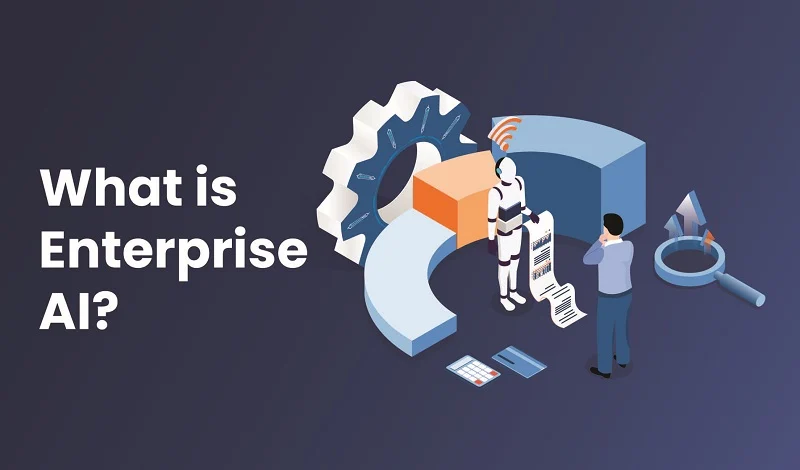
What Is Enterprise AI?
Enterprise artificial intelligence is more than just advanced machine learning algorithms—it’s a system designed to understand, adapt, and integrate within the complex operational structures of large organizations.
Unlike consumer AI, which prioritizes accessibility and ease of use, AI for business and enterprise automation tools must operate at scale while maintaining strict security, compliance, and contextual awareness.
The key differences between enterprise AI and standard business AI lie in:
Contextual awareness: Enterprise AI must understand nuanced roles, responsibilities, and access levels within an organization—not just process data.
Architectural integrity: The foundation of enterprise AI determines its ability to work securely and effectively within an enterprise ecosystem.
Security and compliance: Unlike consumer AI, which prioritizes seamless adoption, enterprise AI requires rigorous validation and safeguards against risks like data leaks.
Simply adopting an AI tool with the most features isn’t enough, complexity doesn’t always equate to effectiveness, its even said that beyond complexity lies simplicity.
Unlike consumer AI, which might assist with generic tasks like summarizing reports, enterprise AI in this case provided real-time, role-specific insights while maintaining strict data governance. For example, Unity used enterprise AI to cut IT problem resolution time from three days to less than a minute, leading to a 91% employee satisfaction rate.
In short, success in your enterprise AI strategy depends on the architecture, security, and adaptability of the solution — not just the version of the model you deploy, but how well it integrates and operates within your organization.
What is an enterprise AI solution?
An enterprise AI solution is a type of software designed to incorporate AI-enabled technologies into large organizations. Leading enterprise AI platforms include these key application types:
Enterprise Resource Planning (ERP) Optimization:
Integrated Data Analytics: Enhance ERP systems with AI to analyze cross-departmental data.
Resource Management: Optimize resource allocation and utilization.
Intelligent Automation:
Robotic Process Automation (RPA): Automate repetitive tasks company-wide.
AI-driven Workflows: Streamline processes across departments.
Predictive Analytics:
Business Forecasting: Predict sales, market trends, and financial performance.
Risk Management: Mitigate risks affecting various business areas.
Data-Driven Decision Making:
Unified Data Platforms: Consolidate data for comprehensive insights.
Virtual Assistants: Assist employees with tasks like scheduling and information retrieval.
Talent Development: Personalize training and career development programs.
5 examples of enterprise AI at work
Enterprise AI offers a wide range of use cases and supports every department across the organization, including:
Human resources: AI revamps HR by automating tasks like resume screening and staff scheduling. HR can make better hires and manage employee needs more efficiently.
Customer service: AI-powered chatbots improve customer experiences with 24/7 support. These chatbots resolve common issues quickly, freeing up human agents for more complicated cases.
Sales: Predictive data analytics guides sales teams in identifying potential customers and tailoring personalized marketing strategies, boosting conversion rates, and improving the overall customer experience.
Engineering: AI streamlines process automation in engineering work, such as predictive maintenance, forecasting equipment failures, and reducing downtime.
IT: Enterprise AI assists IT departments by autonomously resolving or triaging and routing support tickets, helping staff reduce mean time to resolution (MTTR).
Why Businesses Need Enterprise AI in 2026
Ignoring the potential of enterprise AI solutions and AI automation tools puts your business at a disadvantage. Stay competitive by integrating AI for business across your enterprise to gain key benefits like:
Improved efficiency and productivity: by automating tasks and processes. In fact, AI is expected to improve productivity around the world by up to 1.5% annually and drive significant GDP growth.
Enhanced decision-making: through data-driven insights.
Increased agility and responsiveness: to changing market conditions.
Reduced costs: by optimizing resources and streamlining operations.
Improved customer experience: through personalized interactions and support
Greater innovation: by enabling new products, services, and business models
However, not all AI solutions are created equal. The best enterprise AI platforms must be contextually aware, architecturally sound, and built for business needs—not just packed with features. When comparing enterprise AI solutions, you should understand each platform’s strengths, limitations, and ideal use cases.
How to Choose the Right Enterprise AI Platform and Solution
Before evaluating specific vendors, consider these critical factors that apply across all enterprise AI solutions. A thorough assessment ensures you select a platform that aligns with your organization’s technical requirements, business goals, and operational readiness.
Data Security and Compliance
Enterprise AI platforms must meet your industry’s regulatory requirements—whether HIPAA, GDPR, CCPA, or SOC 2 compliance. Evaluate how vendors handle data encryption, access controls, and audit trails. Ask whether the solution supports data residency requirements and how it manages sensitive information across departments. Security isn’t optional; it’s foundational to enterprise adoption.
Integration with Existing Systems
Your enterprise AI solution won’t operate in isolation. It needs to connect seamlessly with your ERP, CRM, ITSM, HRIS, and other critical systems. Review the vendor’s API documentation, pre-built connectors, and integration capabilities. Consider whether they offer native integrations with your current tech stack or if you’ll need custom development. Poor integration creates bottlenecks and undermines ROI.
Scalability and Performance
As your organization grows, your AI platform must scale without degradation. Assess how the solution handles increased data volume, user load, and complexity. Ask about performance benchmarks, infrastructure requirements, and whether the platform can support your projected growth over three to five years. A solution that works well in pilot may falter at enterprise scale.
Time-to-Value Expectations
Enterprise deployments take time. Understand the realistic timeline for implementation, from initial setup through full organizational adoption. Some solutions deliver value in weeks; others require months of customization. Factor in your organization’s capacity for deployment activities and whether the vendor provides implementation support. Faster time-to-value often justifies premium pricing.
Change Management and Adoption Risks
Technology alone doesn’t drive success—people do. Evaluate the vendor’s training resources, documentation, and user support. Consider whether the solution requires significant workflow changes or if it adapts to existing processes. Assess adoption risk by reviewing customer case studies and asking about average user adoption rates. Organizations often underestimate change management complexity, so be realistic about internal resources needed for successful rollout.
Use these criteria as your evaluation framework. No single solution excels in every area, so prioritize based on your organization’s most pressing needs.
Best Enterprise AI Software 2026: 15 Solutions Compared
Finding the right AI solution for your business can feel overwhelming, but it doesn’t have to be.
The best-in-class enterprise AI platforms and solutions provide flexible, scalable options that suit a wide range of business needs.
Whether you’re looking to streamline IT support, boost customer service, or automate workflows, there’s an enterprise AI platform for you. Here are 15 top enterprise AI solutions that can transform your business operations:
Enterprise AI Market Context and Growth
The enterprise AI market is expanding rapidly, with significant implications for business strategy. Understanding market trends helps organizations benchmark their AI investments and adoption timelines.
Market Size and Growth Trajectory
The global enterprise AI market is valued at USD 98 billion in 2025 and is projected to reach a valuation of USD 558 billion by the end of 2035, rising at a CAGR of 19% during the forecast period. In 2026, the industry size of enterprise AI is estimated at USD 116.6 billion. By deployment model, cloud accounted for 69% of the enterprise AI market share in 2024, while hybrid and edge configurations are projected to expand at a 24.05% CAGR to 2030.
Adoption Rates by Company Size
Large enterprises lead adoption but small and medium enterprises are catching up rapidly. Enterprise AI adoption has reached mainstream status with 87% of large enterprises implementing AI solutions, with annual investment averaging $6.5M per organization and process automation leading adoption at 76%. By organization size, the small and medium enterprises segment is predicted to experience the quickest CAGR of 38.6%. U.S. SMB adoption increased from 14 percent to 39 percent in one year, with 55 percent expected to use AI by 2025.
Productivity and Cost Impact Benchmarks
Organizations report measurable gains from enterprise AI deployment. Organizations see 34% operational efficiency gains and 27% cost reduction within 18 months. Companies implementing AI-driven automation experience 20-30% lower operational costs and efficiency improvements exceeding 40%. The average anticipated or realized productivity improvement from Gen AI implementations was 22.6%, with some studies reporting that ChatGPT can improve worker productivity by 37%.
Time-to-Value Averages
Implementation speed varies by solution type. Once an organization commits to exploring an AI solution, deals convert at nearly twice the rate of traditional software: 47% of AI deals go to production, compared to 25% for traditional SaaS. Organizations that follow structured implementation approaches typically see measurable ROI within 6-12 months, as discussed in the implementation section below.
1. Saleseasy
Best for:IT automation and employee support
Harnessing the power ofagentic AI, Saleseasy delivers reliable enterprise AI solutions that serve your entire business out of the box.
Saleseasy helps enterprises deploy enterprise AI platforms in ways thatenhance efficiency and productivity across the organization—not just a single department. From streamlining talent acquisition to enabling self-service IT assistance, Saleseasy delivers a true enterprise-wide solution.
Key features:
AI assistant: Automates complex, repetitive tasks, reducing workload for your support teams
Enterprise search: Lets employees instantly find the information they need with natural language processing
Real-time analytics: Delivers insights for better decision-making
Seamless integrations: Able to connect with your ERP, CRM, ITSM, HRIS, and other enterprise systems
Robust security: Meets high compliance and regulatory standards
Request a demo to see how it works.
2. Salesforce Einstein
Best for:CRM-driven organizations and sales/service teams
Launched in 2016, Salesforce Einstein delivers enterprise AI solutions withpredictive analytics capabilitiesand AI-driven insights across business functions.
It’sseamlessly embedded into Salesforce’s CRM, helping your organization use AI for business without extensive data preparation or management.
Key features:
Einstein Bots: Automate customer service interactions by handling routine queries, freeing up your human agents to tackle more complex issues.
Einstein Prediction Builder: Create custom AI models to predict outcomes, such as lead conversion rates or likelihood of customer churn, without needing to write a single line of code.
Einstein Vision and Language: Recognize images and analyze text to gain a deeper understanding of customer interactions and preferences.
3. H2O.ai
Best for:Data science teams and custom ML model development
H2O.ai offers an enterprise AI platform thatintegrates seamlessly across multiple environments, including cloud, on-premises, and hybrid deployments.
Key features:
AutoML capabilities: H2O.ai’s automated machine learning (autoML) streamlines the model-building process, making it faster and more efficient without sacrificing accuracy or transparency.
Explainable AI: The platform offers robust tools for machine learning interpretability, enabling users understand the decisions made by their models and building trust among stakeholders.
Scalability: With full NVIDIA RAPIDS integration, H2O.ai provides high-performance cloud computing capabilities that support massive scale workloads using both CPUs and GPUs.
4. Google Cloud AI
Best for:Cloud-native enterprises and scalable AI infrastructure
Google Cloud AI delivers enterprise AI solutions with thesame high performance and reliabilitythat users expect from the cloud provider. You getscalable, secure, and powerful AI systemsto help your business stay competitive.
Key features:
Customer Engagement Suite: Provides customizable virtual machines (VMs) that offer high-performance AI capabilities. Compute Engine’s Tau VMs are known for their exceptional price-performance ratio.
Document AI: A set of tools that use AI to extract, analyze, and classify information from documents. Document AI supports various document formats and helps businesses automate data entry and improve accuracy.
Vertex AI: Helps boost conversions and lower abandonment with search, browsing, and recommendations on your digital properties.
5. Glean
Best for:Knowledge discovery and workplace search
Glean provides anAI-powered workplace search and knowledge discovery platform, enabling employees to quickly find relevant information across various enterprise systems and tools. It’s acentralized enterprise AI platformthat connects, secures, and makes sense of your company’s data, powering search, automation, and AI agents.
Key features:
Document AI: Using AI technology, Glean can extract, analyze, and classify information from documents, making data entry easier and improving accuracy.
Generative AI: Glean’s platform allows you to build generative AI apps that automate tasks like answering FAQs, handling IT requests, and generating domain-specific content.
Enhanced Data Governance: Glean supports sensitive data discovery, GDPR and CCPA compliance, and user access review, ensuring a secure and compliant AI ecosystem.
6. Aisera
Best for:Workflow automation and low-code/no-code AI agents
Aisera provides auniversal AI copilot with agentic reasoning and orchestration. It uses domain-specific LLMs and proactive AI agents to deliver enterprise AI solutions thatunify workflows, automate tasks, and provide insights across your whole organization. You can also create custom enterprise AI agents using various low-code/no-code tools.
Key features:
AI search capability across your entire organization: Find exactly what you need, when you need it — no matter where it’s stored so you can get answers to your questions.
Universal AI Copilot: Streamline your operations with one AI Copilot that connects all your tools and systems. Deliver seamless, proactive support across every department to save time, reduce costs, and keep your teams in sync.
Agentic reasoning and orchestration: Get tasks done right the first time with an AI that truly understands your business needs. Aisera’s Copilot delivers personalized, accurate responses and actions.
7. Microsoft Copilot
Best for:Microsoft 365 users and productivity enhancement
Microsoft Copilot is anAI-powered tool designed to improve productivityby integrating into Microsoft 365 applications. It usesgenerative AI and large language models (LLMs)to provide intelligent suggestions and help you generate content, analyze data, and automate tasks with enterprise AI capabilities.
Key features:
Content generation: Copilot can help you create drafts, generate ideas for documents, and rewrite sections of text to improve clarity and style.
Data analysis: In Excel, Copilot can analyze data, suggest trends, create visualizations, and generate summary insights
Meeting insights: Copilot can provide summaries of meetings, highlight key points, and suggest action items, helping you stay on top of your tasks
8. Microsoft Azure AI
Best for:Custom AI development and multi-model deployments
Microsoft’s Azure AI providestools and resources enterprises need to build custom enterprise AI solutionsand solve business challenges at scale.
Key features:
Azure AI Model Catalog: Access over 1,700 foundation models from top creators.
Azure AI Foundry (formerly AI Studio): Build, customize, and manage AI agents and apps for countless use cases.
Azure AI Content Safety: Ensure responsible AI use with robust security, data protections, and custom filters.
Azure offers on-demand, resource-based pricing models. Did you know that Microsoft and Saleseasy can work together? Saleseasy is available for purchase via the Azure Marketplace, allowing organizations to use their pre-committed Microsoft Azure Consumption Commitment (MACC) spend toward Saleseasy licensing.
9. Coveo
Best for:Customer experience and AI-driven search/recommendations
Coveo is an enterprise AI platform forsearch and generative experiencethat optimizes touchpoints along the customer journey. Coveo offersAI-driven search and recommendationsthat personalize customer interactions to improve the user experience.
Key features:
AI-driven search: Coveo leverages user intent and contextual meaning to provide relevant search results.
Generative answering: Their secure solutions, powered by large language models (LLMs), deliver trustworthy answers.
AI recommendations: The platform predicts and suggests content and product recommendations based on activity and past interactions.
10. IBM Watson
IBM has a long history with AI, from its Deep Blue computer to winning Jeopardy to providing enterprise AI solutions. Today, IBM’s watsonx AI portfolio processes vast amounts of data to support various business applications.
Key features:
watsonx.ai: Train, validate, tune, and deploy foundation and machine learning models with ease.
watsonx.data: Scale AI workloads for all your data—anywhere.
watsonx Assistant: Empower everyone in the organization to build and deploy AI-powered virtual agents without writing a single line of code.
11. ServiceNow
ServiceNow’s enterprise offerings include enterprise AI solutions with predictive analytics and machine learning capabilities that automate routine IT tasks and enhance service delivery efficiency.
Key features:
IT service management (ITSM): Automates and streamlines IT service delivery, helping you manage incidents, problems, and changes efficiently.
Customer service management (CSM): Enhances your customer support by automating service requests, problem resolution, and customer engagement.
Virtual agents: Provide conversational support to users, facilitate workflows, and help to reduce the workload on human support staff.
12. Salesforce Agentforce
Salesforce Agentforce is an enterprise AI solution that provides autonomous support to employees or customers. It connects to various data sources, allowing agents to plan, reason, and execute tasks efficiently.
Key features:
Real-time data access: Agents can connect to data sources and use these in real-time to plan and execute tasks.
Customizable agents: Organizations can create custom agents with specific skills tailored to their needs.
Integration with existing systems: AgentForce can connect to existing APIs or use MuleSoft’s pre-built connectors to integrate with 30+ systems.
13. NVIDIA
NVIDIA AI offers a comprehensive ecosystem of enterprise AI solutions that includes infrastructure, enterprise-grade AI software, and AI models to boost productivity and efficiency across various industries.
Key features:
Generative AI: Enables you and your team to build production-ready generative AI solutions to transform business operations.
Data science: Accelerates data processing and AI training, reducing infrastructure costs and power consumption.
AI Inference: Deploys AI models faster and with higher accuracy, achieving faster insights with lower costs.
C3.ai
Best for: Manufacturing, energy, and large operational enterprises
C3.ai is a purpose-built enterprise AI platform designed for complex operational environments. It specializes in real-time AI applications for industrial use cases, combining large-scale data integration with sophisticated AI models to solve specific business problems in manufacturing, energy, utilities, and supply chain management.
C3.ai emphasizes real-time AI capabilities, allowing enterprises to make instantaneous decisions based on streaming data. The platform handles massive data integration challenges across disparate enterprise systems, enabling organizations to leverage their full data assets without extensive data preparation. Its flexibility supports both pre-built industry solutions and custom AI applications tailored to unique operational needs.
Key features:
Real-time AI: Process streaming data and execute decisions in milliseconds
Large-scale data integration: Connect and consolidate data from multiple enterprise systems without moving data
Industry-specific solutions: Pre-built AI applications for manufacturing, energy, utilities, and supply chain
Scalability and flexibility: Supports custom models and applications alongside pre-built solutions
Operational optimization: Predictive maintenance, demand forecasting, and resource optimization
C3.ai is ideal for large enterprises in operational industries that need sophisticated, real-time AI integrated across complex systems and data sources.
Databricks AI
Best for: Data-driven enterprises and advanced ML teams
Databricks AI is a unified data and AI platform designed for enterprises that need seamless integration between data engineering, machine learning, and analytics. It provides a collaborative environment where data engineers, data scientists, and analysts work on the same platform without data silos or complex handoffs.
Databricks emphasizes enterprise-scale model training, deployment, and cross-cloud support. The platform handles massive data volumes while maintaining governance and security standards required by large organizations. Its lakehouse architecture consolidates data warehousing and data lakes into a single system, reducing complexity and cost.
Key features:
Unified data platform: Combines data engineering, analytics, and AI in one environment
MLflow: Open-source framework for managing machine learning lifecycle, from experimentation to production deployment
Delta Lake: ACID transactions and data versioning for reliable data operations
Multi-cloud support: Deploy across AWS, Azure, and Google Cloud with consistent experience
Enterprise governance: Built-in data lineage, access controls, and compliance tracking
Collaborative notebooks: SQL, Python, R, and Scala in shared notebooks for team collaboration
Databricks is best for organizations with large data teams, complex data pipelines, and the need for advanced ML capabilities at enterprise scale.
Enterprise AI Solutions Comparison Table
Solution
Best For
Core Strength
Deployment Model
Typical Enterprise Use Case
Saleseasy
IT automation and employee support
Agentic AI with enterprise-wide automation
SaaS, cloud-native
Self-service IT support, ticket automation, knowledge management
Salesforce Einstein
CRM-driven organizations
Predictive analytics embedded in CRM
Cloud (Salesforce ecosystem)
Sales forecasting, customer service automation, churn prediction
H2O.ai
Data science and ML teams
AutoML and explainable AI
Cloud, on-premises, hybrid
Custom model development, data analysis, predictive analytics
Google Cloud AI
Multi-cloud infrastructure
Scalable, integrated cloud AI services
Cloud (Google Cloud Platform)
Document processing, customer engagement, AI infrastructure
Business applications, data workload scaling, agent creation
ServiceNow
IT and customer service operations
Integrated ITSM and CSM with AI
Cloud (ServiceNow platform)
Incident management, service request automation, ticket routing
Salesforce Agentforce
Autonomous agent deployment
Real-time data access and autonomous reasoning
Cloud (Salesforce ecosystem)
Customer service agents, employee support, custom workflows
NVIDIA
AI infrastructure and model deployment
High-performance computing for AI
On-premises, cloud, hybrid
Model training, inference optimization, data processing
Best For X: Quick Reference Guide
Best for IT Automation Saleseasy and ServiceNow excel at IT operations. Saleseasy automates ticket resolution and knowledge discovery across the entire organization. ServiceNow integrates ITSM workflows with AI-driven routing and automation. Choose Saleseasy for rapid time-to-value and out-of-the-box deployment; choose ServiceNow if you’re already using ServiceNow platform.
Best for CRM-Driven Organizations Salesforce Einstein and Salesforce Agentforce are purpose-built for Salesforce environments. Einstein delivers predictive analytics for sales and customer service. Agentforce creates autonomous agents that reason with real-time data. Both integrate seamlessly without data migration or complex setup.
Best for Custom ML and Data Science Teams H2O.ai and IBM Watson serve data-heavy organizations. H2O.ai emphasizes AutoML and model interpretability for rapid development. IBM Watson provides access to foundation models and scalable data workloads. Choose H2O.ai for faster model building; choose IBM Watson for enterprise-scale data operations.
Best for Enterprise Search and Knowledge Management Glean specializes in workplace search and knowledge discovery across disconnected systems. It consolidates data governance, compliance, and search in one platform. Ideal for organizations struggling with information silos.
Best for Cross-Functional Automation Aisera provides a universal AI copilot for IT, HR, finance, and custom workflows. Its low-code/no-code agent creation enables rapid deployment across departments. Best for organizations wanting single-platform automation.
Best for Productivity and Content Generation Microsoft Copilot integrates into Microsoft 365 for document creation, data analysis, and meeting insights. Ideal if your organization relies on Word, Excel, Teams, and Outlook.
Best for AI Infrastructure and Model Deployment NVIDIA and Google Cloud AI serve infrastructure-focused needs. NVIDIA accelerates AI training and inference on-premises or in the cloud. Google Cloud AI provides integrated cloud services with document processing and customer engagement tools.
Best for Responsible AI and Customization Microsoft Azure AI provides 1,700+ foundation models with built-in content safety and responsible AI frameworks. Best for organizations requiring custom generative AI with compliance controls.
Best for Customer Experience Coveo optimizes customer journeys with AI-driven search and personalized recommendations. Ideal for e-commerce and customer-facing portals.
How to Use This Comparison
Identify your primary use case from the “Best For X” section
Review the core strengths and deployment models that match your infrastructure
Assess integration requirements with your existing systems (ERP, CRM, ITSM, HRIS)
Evaluate time-to-value expectations based on your implementation capacity
Consider whether you need single-platform consolidation or best-of-breed solutions
Most enterprises benefit from combining solutions. For example, Saleseasy for IT automation plus Salesforce Einstein for CRM analytics. The comparison above helps you identify which combinations serve your business needs.
How Agentic AI Supercharges Enterprise AI Solutions and Platforms
Agentic AI helps enterprise AI solutions and platforms achieve advanced levels of automation, digital transformation, and operational efficiency.
Agentic AI goes far beyond traditional AI:
Dynamic analysis: Adjusts to changes and processes new inputs instead of just following preset instructions.
Contextual awareness: Understands the environment, user intent, and constraints, not just the raw data.
Independent actions: Makes real-time decisions with little to no human help.
Continuous learning: Improves its performance over time by learning from past experiences.
In these ways, agentic AI can help enterprises overcome the technical limitations of traditional AI—think rigid, rule-based processing or a lack of contextual understanding—by offering adaptive, context-aware decision-making and continuous improvement. This enables enterprise AI solutions to deliver greater efficiency, reduced human intervention, and more accurate outcomes.
Saleseasy: Enterprise AI Solution for Agentic Assistance
While there are plenty of enterprise AI platforms out there, Saleseasy delivers an enterprise AI solution that’s out-of-the-box ready and delivers fast time to value. It offers:
Combines powerful search and generative AI with automated actions across your tech stack
Works where employees already collaborate (Slack, Teams, etc.)
24/7 personalized support in 100+ languages
More than 300 companies trust Saleseasy as their enterprise AI solution to support employees worldwide—helping them find answers faster, automate repetitive tasks, and boost productivity.
Unsure if it’s the right enterprise AI solution for you? Take it from our customer, Unity, who dropped their IT problem resolution time from 3 days to less than 1 minute—achieving a 91% employee satisfaction rate.
Frequently Asked Questions
What’s the difference between enterprise AI and regular AI?
Enterprise AI is designed for large organizations with strict security, compliance, and integration requirements. Regular AI (consumer AI) prioritizes ease of use and accessibility for individual users. Enterprise AI must operate at scale, handle sensitive data, integrate with existing systems like ERP and CRM, and maintain compliance with industry regulations like HIPAA or GDPR. Regular AI tools don’t require these enterprise-grade safeguards.
How much does enterprise AI cost?
Enterprise AI pricing varies widely based on deployment model, features, and scale. SaaS solutions like Saleseasy and Salesforce Einstein typically charge per user or per transaction, ranging from thousands to hundreds of thousands annually for enterprise deployments. Platform-based solutions like Azure AI and Google Cloud AI use consumption-based pricing. Custom implementations with H2O.ai or IBM Watson may require significant upfront investment plus ongoing support. Request vendor demos and pricing models tailored to your organization size and use case.
How long does enterprise AI implementation take?
Implementation timelines range from weeks to months depending on complexity and your organization’s readiness. Out-of-the-box solutions like Saleseasy can deliver value in 4–8 weeks. Salesforce Einstein integrates quickly if you already use Salesforce. Custom implementations requiring data preparation, model training, and integration with legacy systems may take 3–6 months or longer. Factor in change management and user adoption time, which often extends timelines beyond technical deployment.
What’s the ROI of enterprise AI?
ROI depends on your use case and implementation. Companies report 30–50% reduction in support ticket resolution time, 20–40% improvement in operational efficiency, and cost savings from automation. Unity reduced IT resolution time from 3 days to under 1 minute, achieving 91% employee satisfaction. Calculate ROI by measuring time saved, cost reduction, improved customer satisfaction, and revenue impact from faster decision-making. Most enterprises see measurable ROI within 6–12 months.
Do enterprises need a data science team to use AI?
No. Modern enterprise AI platforms like Saleseasy, Salesforce Einstein, and Microsoft Copilot require no data science expertise. They’re designed for business users and IT teams. However, organizations building custom ML models with H2O.ai or IBM Watson benefit from data science expertise. Low-code/no-code platforms like Aisera enable non-technical teams to create custom agents. Your data science team can focus on advanced analytics while business teams deploy pre-built AI solutions.
Enterprise AI Implementation Best Practices
Enterprise AI deployments succeed when organizations approach them with realistic timelines, clear team structures, and deliberate change management. Based on successful implementations across industries, here are practical best practices.
Typical Implementation Timeline
Most enterprise AI projects follow this realistic timeline: discovery and assessment (2–4 weeks), pilot deployment (4–8 weeks), full rollout (8–12 weeks), and optimization (ongoing). Out-of-the-box solutions like Saleseasy accelerate this timeline to 4–8 weeks total. Custom implementations with data preparation and model training extend to 3–6 months. Plan for change management and user adoption to add 2–4 weeks beyond technical deployment. Organizations that underestimate timeline complexity often face adoption delays and incomplete value realization.
Team Roles Required
Successful implementations require cross-functional teams: executive sponsor (owns business case and removes obstacles), project manager (coordinates timeline and deliverables), IT infrastructure lead (manages integrations and security), business process owner (defines use cases and workflows), change management lead (drives adoption and training), and vendor implementation partner (provides expertise and support). For custom ML work, include a data engineer and analytics lead. Avoid siloing AI projects within IT; involve business stakeholders from day one.
Training and Onboarding
Most enterprises underinvest in training. Plan for 2–3 hours of initial training per user group, with role-specific content. IT support teams need deeper training (8–16 hours) to troubleshoot and escalate issues. Create simple documentation, video walkthroughs, and quick-reference guides. Establish a “super user” group within each department who become internal advocates and trainers. Ongoing training for new employees should be built into standard onboarding. Organizations with comprehensive training programs see 40–60% higher adoption rates.
Change Management Strategies
Communicate early and often. Share the business case, expected benefits, and timeline transparently. Address concerns about job displacement directly; most AI implementations augment human work rather than eliminate it. Start with enthusiastic early adopters, then expand. Create feedback channels so users can report issues and suggest improvements. Celebrate wins publicly—when a team reduces ticket resolution time or improves customer satisfaction, highlight it. Resistance typically comes from uncertainty, not the technology itself.
Success Metrics and KPIs
Track adoption rate (percentage of eligible users actively using the solution), not just deployment completion. Measure mean time to resolution (MTTR) for IT tickets, customer satisfaction scores, and operational cost savings. Monitor time saved per user weekly. Set realistic targets: expect 60–70% adoption in year one, improving to 80%+ by year two. Calculate ROI by comparing time and cost savings against implementation and licensing costs. Most enterprises achieve 6–12 month payback periods.
Common Pitfalls to Avoid
Don’t deploy without executive sponsorship. Don’t skip change management because “it’s just software.” Don’t measure success only by system uptime; measure business impact. Don’t expect immediate 100% adoption; adoption curves are gradual. Don’t deploy to all departments simultaneously; pilot first, then scale. Organizations that follow these practices consistently achieve measurable ROI and sustainable adoption.
Risks and Challenges of Enterprise AI
Enterprise AI deployments deliver genuine value, but organizations should understand real challenges. Awareness helps you mitigate risks and set realistic expectations.
Integration Complexity
Enterprise AI systems must connect to legacy systems, databases, and applications built over decades. Integration is rarely plug-and-play. Custom APIs, data mapping, and middleware development often extend timelines and increase costs. Organizations with fragmented tech stacks face steeper integration challenges than those with modern, cloud-native architectures. Plan for integration complexity in your timeline and budget rather than treating it as an afterthought.
Data Quality Issues
AI systems are only as good as the data they learn from. Many enterprises discover their data is incomplete, inconsistent, or poorly documented. Data silos across departments complicate the picture further. Cleaning and preparing data for AI training often takes longer than expected. Organizations without strong data governance practices may struggle. Invest in data quality assessment before committing to AI projects.
Security and Compliance Risks
Enterprise AI systems handle sensitive data, creating security and compliance obligations. You must ensure data encryption, access controls, audit trails, and regulatory compliance (HIPAA, GDPR, CCPA). Vendor security practices vary widely. Misconfigured AI systems can expose data or create compliance violations. Third-party vendor breaches can impact your organization. Conduct thorough security assessments and establish clear data governance policies before deployment.
Vendor Lock-In
Switching AI vendors after implementation is costly and disruptive. Custom integrations, proprietary data formats, and trained workflows create switching costs. Vendors with larger market share sometimes have less incentive to maintain competitive pricing. Evaluate vendor stability, roadmap transparency, and data portability before committing. Negotiate contract terms that protect your interests and allow flexibility.
Scalability Limitations
AI systems that perform well in pilots sometimes struggle at enterprise scale. Increased data volume, user load, and complexity can degrade performance. Infrastructure costs scale with usage. Some platforms have architectural limitations that become apparent only during large-scale deployment. Test scalability assumptions in your pilot phase. Discuss infrastructure capacity and cost projections with vendors.
Moving Forward
These challenges are manageable with proper planning. Organizations that acknowledge risks, allocate adequate resources, and involve stakeholders typically succeed. The key is realistic expectations and deliberate mitigation strategies.
Your Next Steps: Getting Started with Enterprise AI
The enterprise AI landscape offers genuine solutions for real business challenges. The key is choosing the right platform for your organization’s specific needs and implementing it strategically.
Immediate Actions (This Week)
Assess your priorities: Which business challenge matters most? IT automation, customer service, knowledge discovery, or custom analytics? Your answer narrows the vendor list significantly.
Evaluate your tech stack: Do you use Salesforce, Microsoft 365, or Google Cloud extensively? Starting with aligned platforms accelerates time-to-value.
Identify your stakeholders: Secure executive sponsorship now. AI success requires cross-functional buy-in from day one.
Short-term Planning (Next 2–4 Weeks)
Request demos from 3–5 vendors that match your priorities
Ask vendors about implementation timelines and typical costs for your organization size
Review security certifications and compliance capabilities against your requirements
Speak with reference customers who operate in your industry
Pilot Planning (Weeks 4–8)
Select one use case for your pilot (not your most critical process)
Define success metrics: time saved, cost reduction, user adoption rate
Allocate budget for implementation support and change management
Plan for 6–12 months of ROI realization
Key Takeaways
Enterprise AI is no longer experimental—87% of large enterprises already deploy it. The market is growing at 19% annually, and organizations that act now capture competitive advantage. The 13 solutions reviewed here represent the current best-in-class options across different use cases and company sizes.
Start with realistic expectations, invest in change management, and measure business impact, not just system metrics. Organizations that follow this approach consistently achieve measurable ROI within 6–12 months and sustainable adoption beyond that.
Your enterprise AI journey starts with a single decision. Make it informed.
You are in this life to live. However, in order to achieve the kind of life that you perceive as good, then you have to work for it.
Many times, we get so consumed in working to chase the desired life to a point we forget that our primary goal should be living.
It is for this reason that work-life balance is crucial.
So, what exactly is work-life balance?
Work-Life Balance Explained
Work-life balance can be defined as how you divide your time and energy between work and the parts of life that matter outside of it, such as family, relationships, rest, health, and personal interests.
In simple terms, it is the space between earning a living and actually living your life.
When work takes up more time, focus, or emotional energy than it should, less of it is left for your responsibilities, passions, and the people you care about. Over time, this imbalance affects not just your schedule, but also how you feel, think, and relate to others.
Most people want to achieve a healthier balance between their professional life and their personal life. In reality, this is not always easy. Sometimes, a demanding job provides financial stability or security for a family. Other times, that same job slowly drains your mental health, leaving you exhausted and disconnected in your personal relationships.
Work-life balance, therefore, is not about choosing work or life. It is about finding a way for both to coexist without one constantly erasing the other.
Why Achieving Work-Life Balance Feels Impossible
For most people, the problem is not a lack of discipline or poor time management.
It is volume.
More emails, more messages, more deadlines, and more tasks that repeat themselves every single day. Work has quietly expanded into evenings, weekends, and moments that were once reserved for rest.
As long as work continues to demand constant attention, achieving balance becomes less about choice and more about survival.
This is where automation becomes relevant.
Importance of work-life balance
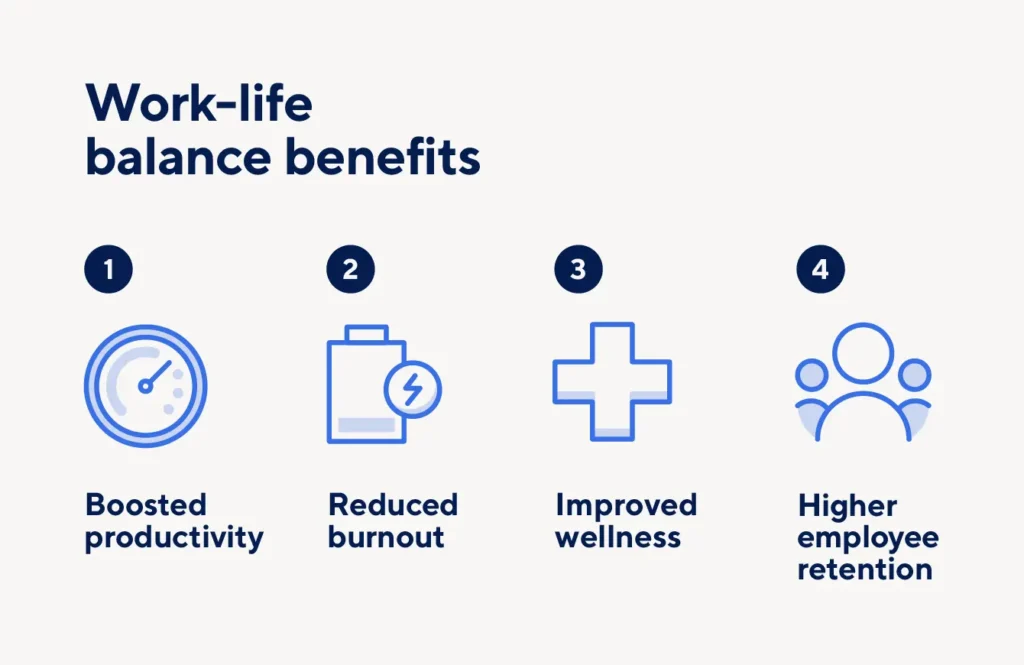
Improving your work-life balance can improve your overall well-being, including your physical, emotional, and mental health.
Research from the Government Accountability Office (GAO) reveals that working long hours can lead to such serious health issues as stroke, coronary heart disease, type 2 diabetes, and increased alcohol consumption, although more research is necessary to determine the precise link between long work hours and negative health outcomes.
Unfortunately, as these conditions arise, they can also exacerbate our work-life issues, leading to burnout and other negative repercussions.
While employers and employees might associate long working hours with increased productivity, many researchers say otherwise. Studies have found that after workers hit a certain number of hours, their cognitive abilities decline. This decrease in mental acuity, focus, and decision-making leads to a decline in effectiveness. Achieving a healthy work-life balance can reduce stress and increase overall productivity.
How Automation Can Improve Your Work-Life Balance
Automation is the use of tools and systems to handle repetitive, time-consuming tasks that do not require constant human decision-making.
Instead of spending hours doing the same work manually, those tasks are delegated to software or simple systems that run quietly in the background.
The goal of automation is not laziness or avoidance of work. It is efficiency.
By reducing the time and mental energy spent on routine tasks, automation creates space. Space to rest. Space to think clearly. Space to focus on work that actually matters, and life that exists outside of it. For small business owners, insights from automation for SMEs show how even simple systems can save time, reduce repetitive work, and give more breathing room in a busy day.
When fewer hours are wasted on repetitive work, it becomes easier to log off without guilt. It becomes easier to be present with family, pursue personal interests, or simply do nothing without feeling behind.
In this way, automation does not replace work. It restores balance.
Why Automation Is No Longer Optional in Achieving Work-Life Balance
Without automation, work tends to spill into personal time.
With automation, boundaries become easier to maintain.
The difference is not effort. It is structure.
People who use automation are not necessarily working less. They are working smarter, with fewer interruptions and less friction, allowing work to stay where it belongs.
Real-Life Examples of Automation at Work
Automation often sounds like something complex or expensive. In reality, it usually starts with small changes that remove repetitive work from your day.
For employees, this can be as simple as automating routine emails or reports. Instead of manually sending the same updates every week, systems can generate and send them automatically. The work still gets done, but your time and attention are freed for tasks that actually require thinking.
Scheduling is another area where automation makes a noticeable difference. Calendar tools that automatically set meetings, send reminders, and follow up reduce back-and-forth communication. Fewer messages mean fewer interruptions, and fewer interruptions make it easier to focus during work hours and disconnect afterward.
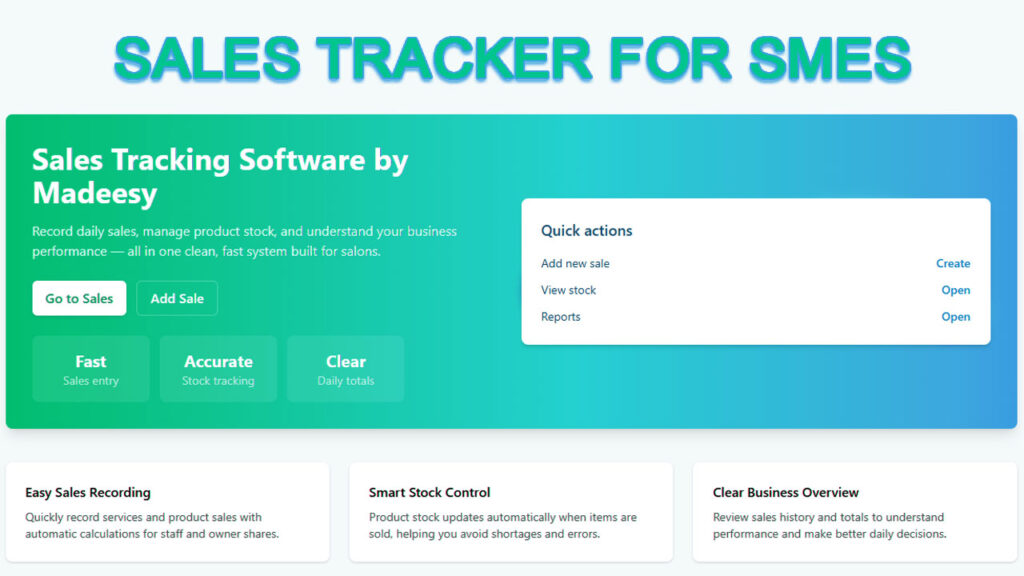
For SME owners, automation often plays an even bigger role. Daily sales tracking, stock updates, and performance summaries are tasks that quietly consume evenings when handled manually. Using a simple sales tracking system like SalesTracker by Madeesy allows sales and inventory to be recorded automatically, giving business owners a clear view of performance without staying late to reconcile numbers. The work continues, even when you step away.
Even small utilities matter. Something as basic as converting documents or images for work can interrupt focus more than we realize. Tools like File Converter by Madeesy, which handle file conversions instantly without extra steps, remove friction from everyday tasks. These small time savings add up over weeks and months.
The impact of automation is rarely dramatic overnight. Instead, it shows up gradually. Ten minutes saved here, an hour there, fewer late nights, fewer unfinished personal plans. Over time, these small gains create real space for rest, relationships, and balance.
Automation and Mental Health
One of the least talked about benefits of automation is its impact on mental health.
When fewer tasks demand constant attention, the mind becomes quieter. Automation reduces cognitive load by handling routine work that would otherwise sit in the back of your head, waiting to be done or remembered.
With fewer follow-ups, reminders, and small decisions pulling at your attention, it becomes easier to stay present during work hours. More importantly, it becomes easier to mentally switch off once the workday ends.
For many people, stress does not come from hard work. It comes from unfinished work.
Automation helps close those mental loops by ensuring tasks continue running even when you step away. Over time, this creates clearer boundaries between work and rest. Work stays at work. Rest feels like rest, not a pause filled with guilt.
How to Start Without Overcomplicating It
Getting started with automation does not require a complete overhaul of how you work.
The simplest approach is to identify one repetitive task that drains your time or energy and start there. It could be reporting, scheduling, follow-ups, sales tracking, or document handling.
There is no need to automate everything at once. Trying to do too much too quickly often creates more stress, not less.
The goal is not perfection. It is relief.
By building systems slowly, you give yourself time to adjust. Each small improvement creates momentum, and over time, these systems begin to support your work instead of quietly consuming your life.
Closing Reflection: Work Should Support Life
You are in this life to live.
Work is important, but it is not the destination. It is the means through which you build stability, purpose, and opportunity.
When work begins to consume everything else, balance is lost. Automation offers a way to restore that balance, not by working less, but by working with intention.
By removing unnecessary effort, you create room for what matters now. Because life does not start later. It is happening already.
Apple, Microsoft, Starbucks, Toyota, and Alibaba all started as small and medium-sized enterprises. In their early years, they were not global powerhouses with unlimited capital or massive teams.
On the contrary, they were small groups making deliberate decisions, learning from their numbers, and adjusting quickly to what the market was telling them.
What stands out when you examine credible company histories, founder interviews, and business case studies, you will come to the realization that discipline beats almost everything including luck, strategy and capital.
In the contemporary business environment, one recurring discipline across growing SMEs is structured sales tracking.
And take note, we not talking of just knowing total revenue, but rather, understanding how sales happen, where they come from, and why some efforts work well compared to others and why some totally fail.
Many small businesses underestimate this. Sales tracking is often reduced to a daily total or a monthly figure. Many businesses people within the SME category do not fully exploit the potential of data.
The truth is, businesses that grow consistently treat sales data as feedback.
For them, however small a business can be, lets say a salon, fruit vendor or even taxi business, data informs decisions, exposes inefficiencies, and guides expansion. That is where sales tracking software becomes essential and not optional especially in 2026 and the years to follow when AI has made things very easy.
The Significance of Sales Tracking for Small Businesses
SMEs operate with limited margins for error. This is different when comparing to large corporations. For small to medium businesses, they are not at the mercy of absorbing repeated mistakes, wasted effort, or poor planning.
Every decision matters, be it pricing, inventory, staffing, and marketing carries weight.
Without structured sales tracking, business owners often rely on memory, assumptions, or scattered records which is very risky.
Using such backward methods makes it difficult to identify trends, predict revenue, or understand customer behavior.
What you ought to know is that over time, decisions become reactive rather than intentional.
Sales tracking software introduces clarity and structure into daily operations. It replaces guesswork with visible data, allowing business owners to make decisions based on what is actually happening, not what they think is happening. The section below outlines nine advantages of using a sales tracking software for your small business.
1. Sales Tracking as a Decision-Making Tool
A sales tracker is not simply a record-keeping system. Used correctly, it becomes a decision-making tool. This distinction matters, especially for small businesses.
Instead of asking, “How much did we sell last month?” the better questions become:
Which products or services are driving revenue?
Where are customers dropping off in the sales process?
Which days, channels, or staff perform best?
What patterns repeat over time?
These are questions that spreadsheets and notebooks struggle to answer consistently.
2. Clear Sales Visibility and Reliable Forecasting
One of the biggest challenges SMEs face is uncertainty. When revenue feels unpredictable, planning becomes stressful and often inaccurate.
Sales tracking software provides visibility into the sales pipeline. Business owners can see what stage each sale is in, whether it is a call, a meeting, a walk-in customer, or a completed transaction. This makes it possible to forecast revenue with more confidence.
Rather than reacting to surprises, businesses can anticipate slow periods, prepare for high-demand seasons, and make adjustments early. Over time, this stability supports healthier cash flow and smarter planning.
3. Deeper Understanding of Customers and Buying Behavior
Sales tracking goes beyond totals. It reveals patterns in customer behavior.
Over time, sales data shows:
Who your repeat customers are
What they buy most often
Which products perform well and which do not
How pricing and timing affect conversions
This insight allows small businesses to refine their offerings, improve pricing strategies, and create better customer experiences. When customers feel understood, trust grows, and repeat business becomes more likely.
4. Improved Efficiency and Sales Productivity
Manual sales tracking takes time and often leads to incomplete or inaccurate records. Important details get lost, and reporting becomes a chore.
Sales tracking software automates this process. Transactions are recorded consistently, reports are generated automatically, and data is stored in one place. This reduces administrative work and frees up time for activities that actually generate revenue.
Clear targets, visible progress, and structured workflows naturally improve accountability and productivity, even in very small teams.
5. Real-Time Insight and Faster Decisions
Waiting until the end of the month to review sales performance often means missed opportunities. By the time issues are visible, they have already affected revenue.
Sales tracking software provides real-time insight. Business owners can see performance as it happens and respond quickly. If a product is underperforming, adjustments can be made immediately. If demand increases, inventory or staffing decisions can follow without delay.
Faster access to accurate information leads to faster, better decisions.
6. Better Team Alignment and Transparency
For SMEs with employees or sales representatives, centralized sales tracking creates transparency. Everyone works from the same data, reducing confusion and miscommunication.
Managers can monitor performance fairly, identify strengths and gaps, and support team members where needed. For service-based businesses, this also simplifies commission calculations and performance reviews, building trust and motivation within the team.
7. Smarter Use of Resources and Lower Costs
Sales data highlights what works and what does not. When business owners understand which products, services, or customers generate the most value, resource allocation becomes clearer.
Time, money, and effort can be focused on high-performing areas while unnecessary costs are reduced. This improves profitability without adding complexity to operations.
8. Sustainable Growth Through Better Conversions
Sales tracking makes it easier to identify where potential customers drop off in the sales process. Even small improvements in conversion rates can have a meaningful impact on revenue.
More importantly, growth becomes intentional. Instead of expanding blindly, businesses grow based on real performance data and proven demand.
9. Moving Beyond Books and Spreadsheets
Many small businesses still rely on notebooks or basic spreadsheets. While this may work in the earliest stages, it limits visibility and increases the risk of errors.
Modern sales tracking tools automatically visualize data, highlight trends, and reduce manual effort. Most are affordable and accessible, especially when compared to the cost of missed opportunities, poor planning, and slow growth.
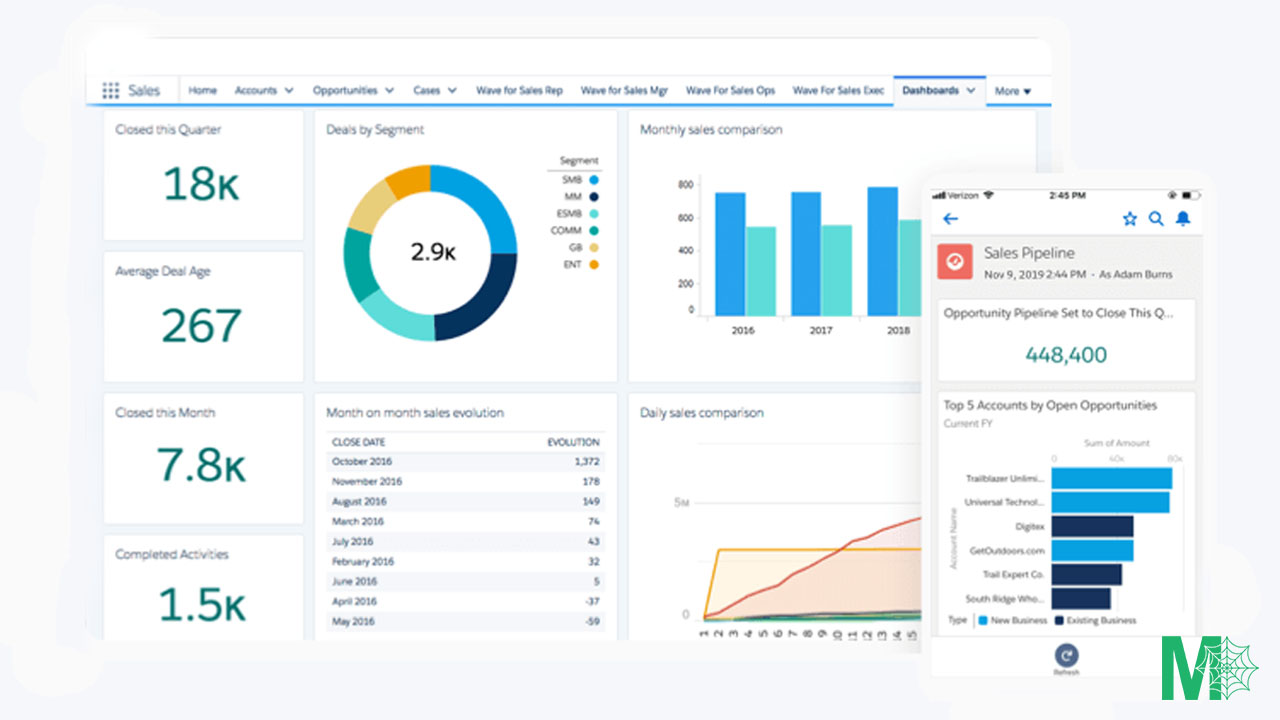
Some platforms, such as Madeesy sales tracking , offer structured ways to view daily, weekly, and monthly sales performance in one place. These tools are best understood not as software purchases, but as systems that support better decision-making.
Final Thoughts
Sales tracking is not about chasing numbers. It is about understanding how your business works.
SMEs that adopt sales tracking software gain clarity, control, and confidence. They make fewer assumptions, respond faster to change, and build growth on real insight rather than instinct alone.
For small businesses with long-term ambitions, sales tracking is not an upgrade. It is a foundation.
The AI market is exploding from $196.63 billion in 2023 to a projected $1.81 trillion by 2030. In 2026, nearly every is rushing to build the next AI that will outcompete ChatGPT, however, the truth is, that’s not where the money really is.
If your goal is to find legitimate AI business opportunities that don’t require you to have a background in coding, then you are in the right place.
In this guide, we reveal where actual profits hide within the AI economy. The businesses shared here are practical and proven to generate from $85K to $150K every year for individuals. For companies, the ideas shared in this guide generate more than $50 million.
Who This Guide Is For:
Entrepreneurs seeking AI side hustles with real revenue potential
Contractors and service providers looking to capitalize on AI infrastructure growth
Non-technical founders wanting to start an AI business without coding
Anyone tired of AI hype and ready for actionable opportunities
Why Most AI Startups Fail
A lot of people are building AI startups but the brutal truth is that more than 70% of the will fail within three years. If you research, you will find out that so many AI companies are failing. Research has it that the average AI startup burns through $800K-$1.2M monthly, and most won’t make it past 18 months.
It is thus imperative to think differently if your goal is making money with AI. The real wealth within the AI industry is hiding in plain sight.
Let us now dive into where the actual money flows in AI. There are 5 tiers of the AI economy and in this guide we will rank them in regard to profit potential and accessibility.
Tier 1: Energy & Infrastructure
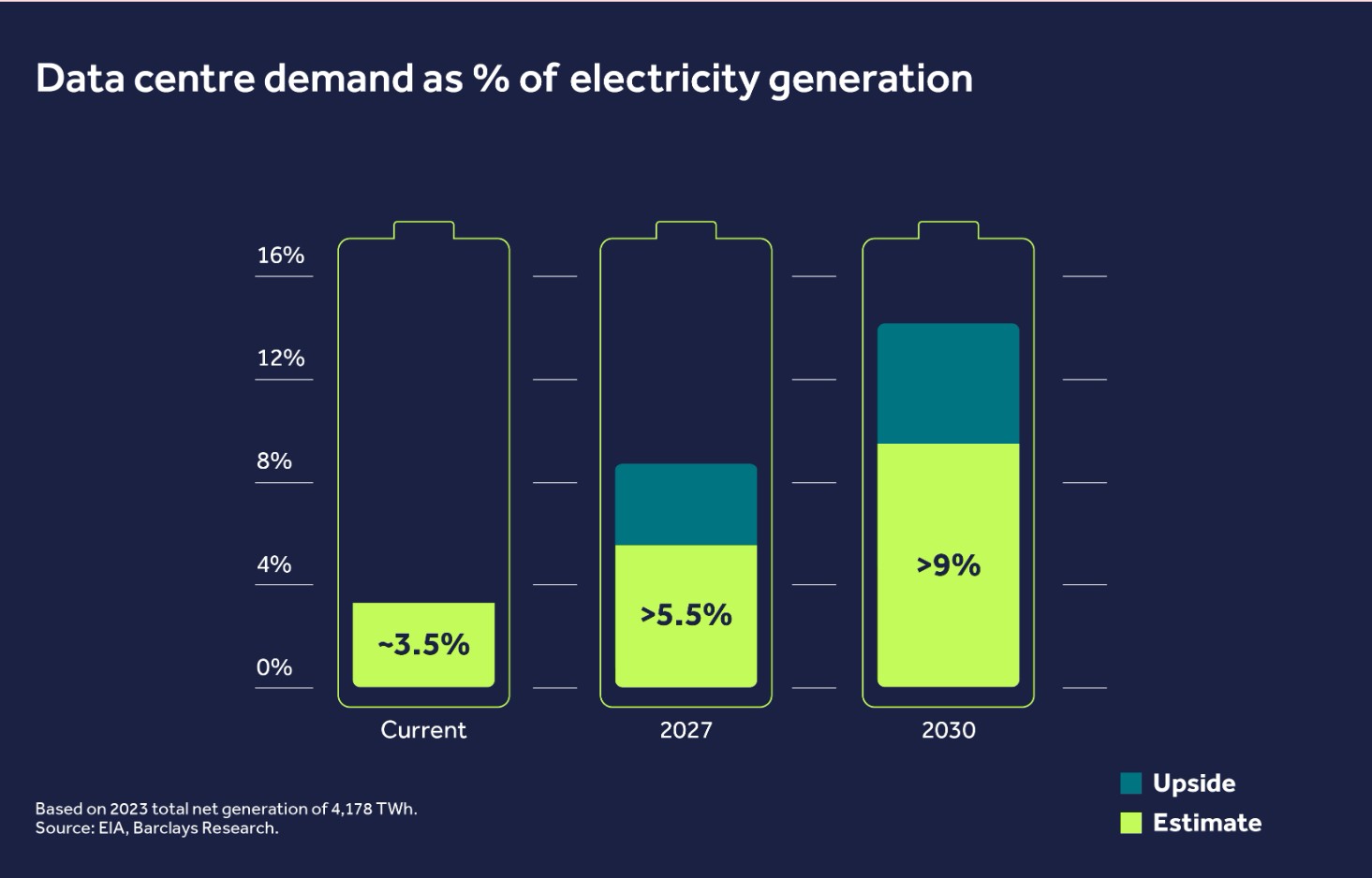
Start at the bottom of the stack. AI lives in the cloud, but the cloud needs power. Massive amounts of it. AI data centers now consume 4% of global electricity and that’s projected to hit 8% by 2030. We’re talking about facilities consuming more electricity than entire countries.
Microsoft, Google, and Amazon are investing over $150 billion combined in data center infrastructure through 2025. That’s not hyperbole but rather the actual math.
So who benefits from this? The ones who benefit are the companies building the infrastructure. A good example is Hanley Energy. This company is not flashy not is getting venture capital headlines, however, they’re building the actual facilities that power the entire AI economy.
If you don’t have a background in coding, this is still your play. Actually, this is one of the best AI business opportunities for non-technical founders.
What you should do is becoming a specialist contractor or open a company in the sector. Know your region. Build expertise around data center services. The big guys don’t want to send their teams cross-country for routine maintenance. Local contractors with data center expertise are billing $120-$250 an hour for work that’s absolutely critical.
Average earnings for data center contractors: $85K-$150K annually, with experienced specialists earning significantly more.
Companies like Promera Solutions figured this out early. In the beginning, Promera started by cleaning data centers. Now they’re the industry standard with over $50M in annual revenue. They do one thing obsessively well. That’s the template. Find a specialized service, master it, and scale within the AI infrastructure ecosystem.
Tier 2: Data Center Services: The $342B Market
The data center market hit $342 billion in 2024 and is projected to reach $622 billion by 2030. Investment jumped 51% year-over-year. Microsoft, Meta, Amazon are all pouring billions into physical infrastructure. But what about the plumbing? The roofing? The HVAC systems? The wiring? The local contractors that these AI empires literally cannot function without?
This is how you make money with AI without coding skills. It’s not sexy. It won’t get you on a podcast. But the people making money here? They’re making real money. JM Tech Group cleans data centers.
Sounds boring, right? Except they’re not just cleaning. They’re inspecting for fire hazards. Finding disconnected cables. Spotting problems that could cost millions in downtime. They went from janitor work to risk management consulting.
Guess who gets paid more? The consultant. This is AI infrastructure business at its finest—practical, profitable, and accessible.
Tier 3: Foundation Models
Then you’ve got Tier 3: foundation models. OpenAI, Anthropic, Google, X. These are the oil rigs. Big money. Long timelines. Uncertain returns. You and I aren’t investing there. Most people can’t compete at that level.
But here’s what matters for making money with AI: you don’t need to build the oil rig. You just need to sell something to the people running it.
The typical early-stage AI startup burns through $10 million in funding, which only gets you 20 months of runway. And during that time, you’re bleeding money because you have too many users and each one costs you cash.
OpenAI’s revenue jumped from $3.7 billion to $12.7 billion recently, but their training costs grow exponentially. Future models will cost billions to train.
This is why the infrastructure layer is where the real profit margins live. Infrastructure providers have 3-5x higher survival rates than application-layer startups.
Tier 4: AI Tools & Infrastructure Layer
Think of the plumbing layer of AI. APIs. Deployments. Orchestration tools. Frameworks. It’s like AWS for AI. Not sexy. Neither is Stripe or MongoDB. But look at how much money those companies are worth. Multi-billion dollar businesses because they make everything else work.
This tier offers legitimate AI business ideas for technical founders who want to build picks-and-shovels rather than panning for gold.
There’s something weird happening though. The big tech companies are all sleeping with each other. Nvidia and AMD invest in companies they sell to. Anthropic uses Amazon Web Services.
Amazon is an investor in Anthropic. Microsoft is invested in OpenAI and counts OpenAI as a customer. This is called circular financing or rather circular AI economy. It clouds actual demand. Are they making all that revenue or just paying each other?
Tier 5: AI Applications
Tier 5 is AI-native applications. This is where most people are playing, and where 78% fail within three years. Building without a business model. Chasing users instead of revenue. Most won’t survive. But if you focus on AI business opportunities that replace cost centers and drive real productivity, you’ve got a shot at profitability.
The problem? Tools like Replit and Cursor let you play startup founder for a weekend. You build something that looks legit. You feel like a genius. Maybe you get a few users. Cool story. But when it’s time to actually scale? When the demo breaks at 2 a.m. and customers are screaming? When you need to connect payment processors, databases, APIs, all the back-end plumbing that makes real businesses work? You’re cooked.
Here’s what nobody talks about: if you actually win at this level, big tech becomes your biggest threat. Not because they’ll copy you. They’ll steal your team. Meta slides into your senior engineers’ DMs with a $2 million package. Who says no to that?
How to Start Your AI Business in 2026: Practical Steps
So what’s the move if you want to make money with AI?
First things first, stop waiting and procrastinating. 2026 is time to start owning. You should be on the move so that by the time other people feel safe to use AI and have stopped fearing it, you will have already made money.
Starting today, you should use AI to speed up ownership because AI is a tool like any other and its use comes with its ability to automate and multiply.
The biggest AI opportunities as you have realized comes with being an early adopter. Right now, 72% of businesses are using AI, this is a 35% increase from 2023. However, many businesses are still figuring it out. Research shows that some workers are spending more time correcting AI output than doing actual work and there we find the first gap which translates to an opportunity.
If you can get ahead of these trends, you’re going to make money with AI faster than the competition. The real benefits come in the form of AI agents and not generative AI. Why? Because Agentic AI can plan and understand goals.
Additionally, they can make decisions without constant human interventions. Take for example, most of the Apps and softwares that we at Madeesy Solutions have made have been largely through the help of agentic AI, the likes of Microsoft copilot, AutoGen, Unity AI Assistant and many others. Based on forecast, the AI agent market is projected to reach $47 billion by 2028. Eventually this means having a little team of digital workers handling tasks for you around the clock.
The key to making money in the AI age isn’t letting AI think for you. It’s making it think with you. Most people let AI copy what’s already out there. You be original. You move fast. AI can only generate, but you can direct.
Final Thoughts: Time in the Market Beats Timing the Market
Don’t try to time the AI market. Start as early as yesterday. It’s time in the market that counts. The infrastructure is being built right now and the opportunities are here today. Start learning, start building relationships, start positioning yourself in the AI economy while there’s still room to establish yourself as an expert.
In 2026, competition in the business landscape is increasing faster than ever, largely driven by artificial intelligence and automation. Tasks that once took hours can now be done in minutes, and businesses that adapt quickly are the ones that are most likely going to survive and grow.
For small and medium enterprises, speed is no longer optional. Managing customer relationships, tracking finances, and handling daily operations is becoming more demanding, especially for businesses that still rely on manual processes.
This is why automation has become a game changer. It’s no longer reserved for large corporations. Small businesses that embrace automation can save time, reduce costs, and compete effectively while scaling their operations.
What is Business Automation?
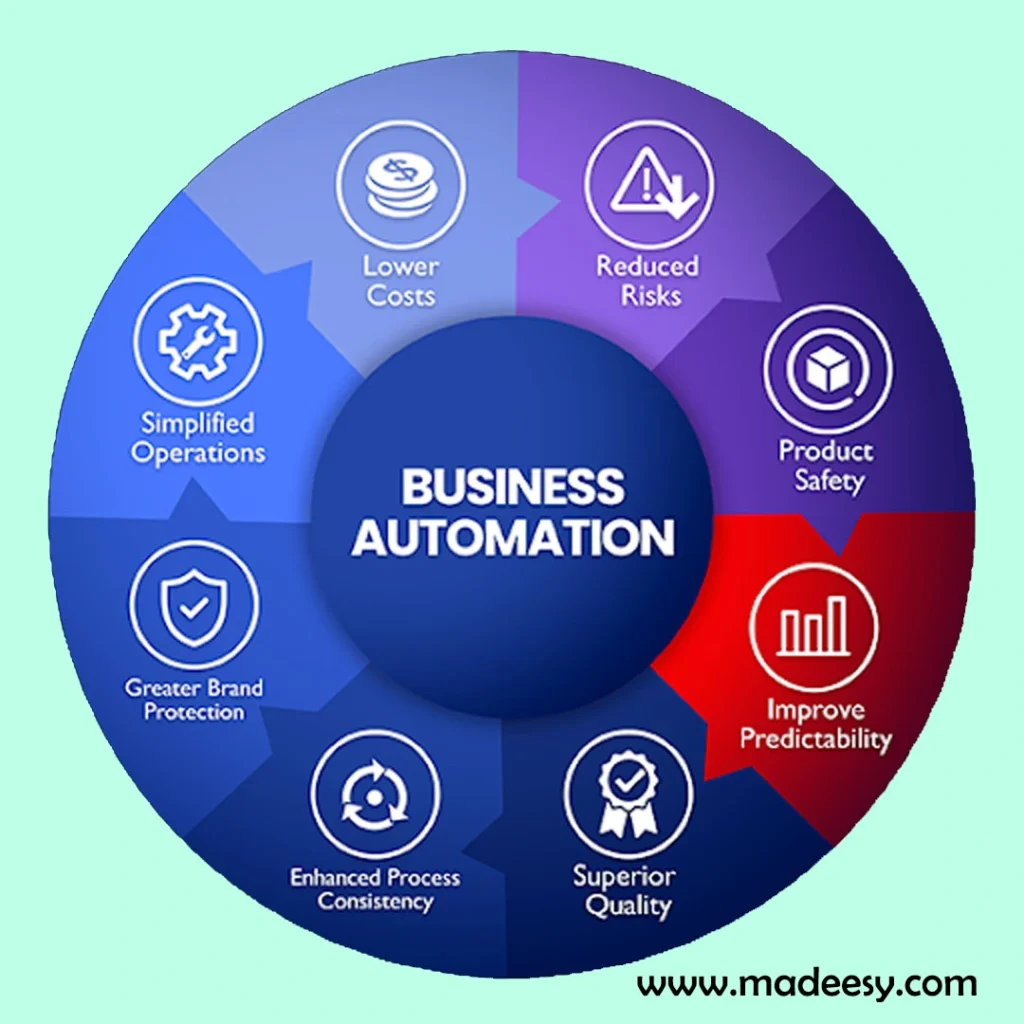
Business automation is the use technology to perform repetitive tasks and processes with minimal human intervention.
According to research sourced from Expensify, business automation can range from simple email scheduling to complex workflow management across multiple platforms.
The goal for using automation systems in any business is usually to avoid or eliminate repetitive tasks so that you or your team can focus on strategic activities that actually drive growth.
In the following sections, we will explore the advantages that automation has on business, and especially for small to medium enterprises (SMEs).
How Automation Compoundly Saves Time
When you here about business automation, the first thing that comes to mind is technology and closely follows time saving.
When you employ automation in your business, however small, you are guaranteed that you will save a lot of time and well, time is money so you get to save money too.
Saving time is the most important advantage that comes with automation. A study conducted by Rippling shows that the average entrepreneur dedicates up to 16 hours weekly to repetitive processes.
Question is, why spend two full working days doing the same thing that you could just automate and spend those 48 hours doing something else.
It’s time to start automating and focusing your energy on developing new products, building customer relationships, and planning for growth, because sooner or later, your business will need scaling.
Consider social media management alone. It’s okay to post your own Instagram posts, but that does not apply for your business, when you running a business, the business does not care whether you are bored, sick or busy, you need your content posted at scheduled intervals daily.
It is for this reason that it’s important to integrate automation in running SMEs.
Companies implementing automation tools for posting content and managing ads can save more than six hours per week, according to research from Unmudl. That’s over 300 hours annually that your team can redirect toward strategy and innovation.
A Practical Automation Example for Service-Based Businesses
A good example of simple automation is sales tracking, especially for service-based businesses like salons and nail studios. We’ve built a simple sales tracker that we’re offering completely free.
Instead of writing daily sales in notebooks, the tool lets you record everything digitally in one place.
It automatically calculates your profit, tracks how many clients you’ve served, monitors expenses, shows remaining stock, and gives you a clear picture of how the business is actually performing.
It’s designed to save time, reduce errors, and help you understand your numbers without needing accounting skills.
You can try the sales tracker today, and if it helps your business, feel free to share your feedback with us or with other business owners who might benefit from it.
The financial benefits of automation are compelling. According to MHC Automation, small businesses that make the switch to automation save money in the long run.
From their study, automation is a game change in any operations of a business whether it’s automating accounting, employee onboarding, or inventory management.
Yes, it’s true that there is an upfront cost that will be needed for you to implement these automation tools, however, since you are a business owner then you clearly know that for you to improve your business you have to spend also.
What you should know is that the amount of money you will use integrating these automation tools will be nothing compared to the return on investment that you are going to get.
In a study conducted by the Data Science Central, it was discovered that small businesses lose over $600 billion each year due to human error.
Their findings revealed that automation dramatically reduces these costly mistakes. For example, automated invoice processing ensures accuracy that manual data entry simply can’t match.
To put this in context, companies like Uber have saved $170,000 in employee hours by automating expense tracking, as reported by Systems and Teams.
The scale of savings depends on your investment level. According to research from North Carolina Central University, companies with significant automation investments averaged a 17% reduction in costs versus only 7% for those with smaller investments.
How Automation Improves Accuracy and Consistency
Manual processes are prone to errors. When employees handle repetitive tasks, quality can vary based on who’s doing the work and how they’re feeling that day.
Automation ensures tasks are done the same way, every time, by every person. This consistency is crucial for maintaining standards and building customer trust.
Bill.com reports that automation improves accuracy and helps businesses stay current with evolving regulations.
Financial automation software uses internal controls to assign specific roles and permissions, creating a clear separation of duties that protects your business from fraud and compliance issues.
Empowering Your Team with Automation
Contrary to concerns about job displacement, automation actually makes employees happier.
According to research from PartnerStack, 89% of automation users feel more satisfied with their jobs, and 84% feel more satisfied with their company.
This is because automation eliminates the mind-numbing, repetitive work and frees people to focus on tasks that require creativity and critical thinking.
When your accounting team isn’t buried in data entry, they can focus on financial analysis.
When your sales team isn’t manually updating spreadsheets, they can spend time building relationships with prospects. This shift in focus leads to higher engagement and better results.
Competitive Advantage
Small businesses often lack the resources of large corporations. But automation levels the playing field. According to ActiveCampaign’s research, 88% of small companies say automation enables them to compete with big businesses. Automation is no longer optional—it’s a competitive necessity.
The statistics back this up. Nearly 80% of top-performing companies have used marketing automation for more than two years, according to research firm Gleanster.
Businesses that adopt automation early gain a significant advantage over competitors still relying on manual processes.
Scaling Without Proportional Cost Increases
One of automation’s most powerful features is its scalability. As your business grows, you can expand your automation without proportional increases in costs.
Impact reports that this is a massive benefit, allowing businesses to be as agile as possible by quickly and efficiently scaling up or down depending on seasonal demands or consistent growth.
This scalability means you’ll never outgrow your automation solution, and you won’t be forced to pay for software capacity you don’t need. Your automation grows with you.
Getting Started with Automation
The beauty of modern automation is that you don’t need a massive tech stack or huge budget to begin.
Good news is that most of these tools have free tier which often enough for small businesses, however, after trying and seeing the benefits, it will be up to you now to consider upgrading for a paid version.
Some of the reputable automation tools are Zapier, HubSpot, QuickBooks, and Mailchimp.
All these offer affordable solutions designed specifically for small businesses and they have free tiers or trial periods that let you test their effectiveness and efficiency before committing for paid version.
The key is to start small. Focus on one or two time-consuming tasks, choose a simple tool, and automate that. Small changes lead to big results. As you see success, you can expand your automation efforts to other areas of your business.
Let’s Wrap This Up
Summing up, automation is no longer a luxury but rather a strategic necessity for modern small businesses.
With automation, the time and money you get to save, improved accuracy and competitive advantages are too significant to ignore especially in 2026 as technology continues to grow rapidly.
Whether you’re managing a growing team or running a solo operation, the right automation tools can transform how you work, freeing you to focus on what truly matters which is growing your business and delighting your customers.